1. Installing Sidechain SDK
We’ll get started by setting up our environment.
1.1. Supported platforms
Sidechains-SDK is available and tested on Linux and Windows (64bit).
1.2. Requirements
Horizen Sidechain SDK requires Java 8 or newer (Java 11 recommended), Scala 2.12.10+ or newer, and the latest version of zend_oo.
1.3. Installing on Windows OS:
- Install Java JDK version 11 (link)
- Install Scala 2.12.10+ (link)
- Install Git (link)
- Clone the Sidechains-SDK git repository (link): git clone git@github.com:ZencashOfficial/Sidechains-SDK.git
- As IDE, please install and use IntelliJ IDEA Community Edition (link) In the IDE, please also install the Intellij Scala plugin: in the Settings->Plugins tab, select it from the marketplace:
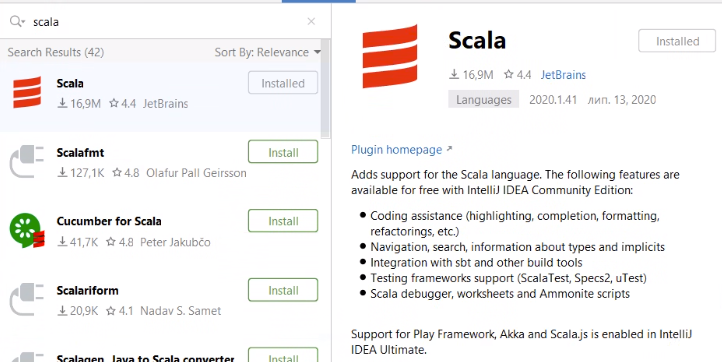
- In the IDE, you can now go to File and Open the root directory of the project repository, “Sidechains-SDK”. The pom.xml file, the Maven’s Project Object Model XML file that contains all the project configuration details should be automatically imported by the IDE. Otherwise, you can just open it.
- Keep reading this tutorial, and start playing with the code. You will find some sidechain examples in the “examples/simpleapp” directory, that you can customize, start from there! When you are ready to run your standalone sidechain, you can install Maven (link).
- To produce your specific sidechain jar files, you can change directory to the repository root and run the “mvn package” command.
1.4. Installing on Linux OS:
- Install Java JDK version 11 (link)
- Install Scala 2.12.10+ (link)
- Install Git (link)
- Clone the Sidechains-SDK git repository (link): git clone git@github.com:ZencashOfficial/Sidechains-SDK.git
- As IDE, please install and use IntelliJ IDEA Community Edition (link) In the IDE, please also install the Intellij Scala plugin: in the Settings->Plugins tab, select it from the marketplace:
- In the IDE, you can now go to File and Open the root directory of the project repository, “Sidechains-SDK”. The pom.xml file, the Maven’s Project Object Model XML file that contains all the project configuration details should be automatically imported by the IDE. Otherwise, you can just open it.
- Keep reading this tutorial, and start playing with the code. You will find some sidechain examples in the “examples/simpleapp” directory, that you can customize, start from there! When you are ready to run your standalone sidechain, you can install Maven (link).
- To produce your specific sidechain jar files, you can change directory to the repository root and run the “mvn package” command.
1.5. Sidechain SDK Components:
As a result of step 8, three jar files will be generated:
- sdk/target/Sidechains-SDK-0.2.0.jar - the main SDK jar file, that contains all the necessary classes and components;
- tools/sctool/target/Sidechains-SDK-ScBootstrappingTools-0.2.0.jar - executable bootstrap tool. It is used to create the configuration of the new Sidechain. You can find all available commands and examples of usage in the examples/simpleapp/mc_sc_workflow_example.md file;
- examples/simpleapp/target/Sidechains-SDK-simpleapp-0.2.0.jar - in contains a Sidechain application example. You can find more details in the examples/simpleapp/readme.md file.